HomeCourse® Indoor Golf Simulator Enclosure for $1,899
April 30, 2020 / by Marco / Categories : Business, deals, design, entrepreneur, website




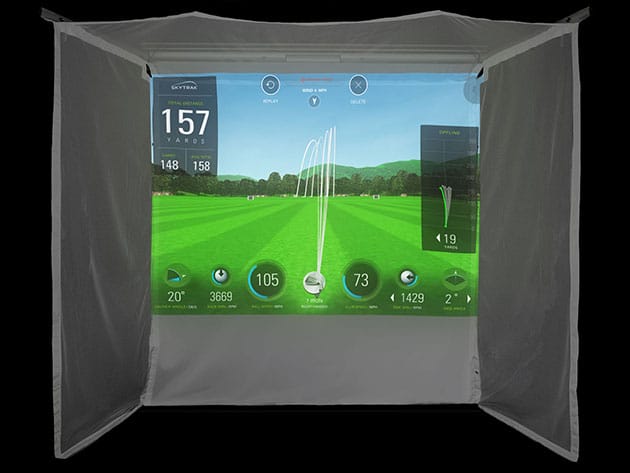

KEY FEATURES
At the click of a button, the HomeCourse® Pro Screen creates an indoor driving range or golf simulator enclosure, and when you’re done, your room returns to its original form just as easily. The screen is made of ballistic grade material designed to absorb the impact of a golf ball hit by a full-swing shot at point-blank distance. It also features a sky netting and pro-arms to create an enclosure that contains errant shots. The screen flexes at the bottom so the ball can roll back to your feet. The HomeCourse® screen can be used with any projector and golf simulator and is easily retractable. It works virtually anywhere–home, office, store, or facility, an ideal teaching, training, and practice tool for golfers and trainers.
- Sky netting & pro-arms create an enclosure to help contain errant shots
- Ballistic-grade screen material absorbs ball impact
- Screen flexes at the bottom so the ball can roll back to your feet
- Converts any room into a virtual golf practice area in less than 30 seconds
- Easily retractable so you can get your room back
- Can be used w/ any projector & golf simulator
- Motor runs on a lithium-ion battery that operates for months between charges; use wireless remote
Note: Golf simulator NOT included.
PRODUCT SPECS
Specs
- Materials: metal, plastic, synthetic fabric
- 3ft Pro Arms
- 8ft full height (screenextended)
- 6″ minimum mounting distance from ceiling
- Projectable area: 7.5ft x up to 7ft
- 18″ minimum mounting distance from wall
- 10ft 6″ w/ Pro Arms extended
- Recommended space size: 8ft 6″H x 10ft W x 8ft D
- Manufacture’rs 1-year warranty
Includes
- HomeCourse® Indoor Golf Simulator Enclosure
- Ceiling mount kit
- Charging cable
- Remote control
- Easy reach pole

Marco / admin / 30 Nov
Writing day to day ramblings about making money, business, technology, sharing awesome deals and everything else that I know I'll forget. Follow my personal blog https://marcotran.com.au
I've recently also turned Vegan and started this website Veggie Meals - check it out
"When technology speaks for itself, that is art" - MT
Affiliate Compensated: there are some articles with links to products or services that I may receive a commission.
OTHER ARTICLES YOU MAY LIKE
STOP NOISY CALLS: THE ANDROID SETTING YOU SHOULD SWITCH ON TODAY
Phone calls still matter. Whether you’re speaking to a client, checking in with family, or handling something urgent on the move, clarity can make or break the conversation. If you’ve ever found yourself apologising for the construction noise behind you, the wind across your microphone, or the café chatter muddling your words, there’s an Android […]
read more
FILMORA 15 – WHAT’S NEW? AI EXTEND, DYNAMIC CAPTIONS, TRUE TIMELINE EDITING + INSTALL GUIDE
There is a particular thrill to installing a major new release of your everyday editor, especially when your workflow is comfortable and productive in the current version. That feeling is right at the heart of the move from Filmora 14 to Filmora 15. This upgrade promises fresh creative features, faster handling of complex projects, and […]
read more